


Phone Clean Fix
4.53.17K Reviews
App Specs
- Version
- 1.1.3
- Updated On
- License
- Free
- Downloads
- 5,000,000+
- Developer
- Mr.Appp.86
- Categories
- Tools
- Platform
- Android
Screenshots

 Analysis by AppCompare
I find phone-cleaning apps most useful in a shared household when they help someone make sense of a crowded device without turning cleanup into a technical project. Phone Clean Fix is a free tools app from Mr.Appp.86, and its appeal is straightforward: it brings cleaning and basic device management into one place. I would treat it as a practical helper, though, not as a magic fix for every slowdown or a substitute for deciding what files the people using a phone actually want to keep.
A shared phone needs a careful cleanup routine
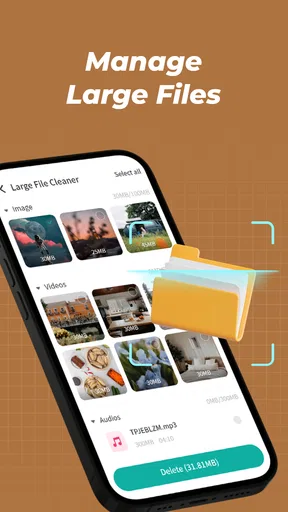
Picture a family tablet or a phone passed between relatives for photos, messages, and videos. When storage starts to feel tight, the first instinct may be to delete anything that looks disposable. I prefer a slower approach: identify the biggest files, ask who they belong to, and only then decide what can go. The app’s large-file management feature is relevant here because it can help bring bulky items into view; it does not remove the need for a person to make the final call.
That distinction matters on a shared device. A video that looks old to one person may be important to someone else, and a cleanup action can have consequences beyond freeing space. I’d use the app as a prompt to review storage, not as permission to clear everything at once. If several people use the same phone, agree on who is responsible for checking files before making changes. That simple habit is more valuable than any one-tap routine.
Set boundaries before handing over the phone
Phone Clean Fix is a device-management utility, not a household account system. I would not expect it to create separate profiles, decide which family member owns a file, or coordinate cleanup between people. Keep those boundaries clear: the person who owns or manages the device should review what the app identifies, while other users should know that cleaning may affect shared storage.
A useful workflow is to check the device when the main user is present, sort the largest items by ownership or importance, and leave uncertain files untouched. If you are helping a less technical relative, explain what a cleanup action means before tapping it. This avoids the common mistake of treating a cleaner’s suggestions as a list of unquestionably disposable items.
Coordination beats automatic tidying
For a household, the best routine is not necessarily to run every available tool as often as possible. I would start with the specific problem—full storage, background activity, or battery drain—then use only the relevant part of the app and see whether it helps. That is more measured than repeatedly pressing a general clean or boost control, particularly when different people rely on the phone for different tasks.
On a shared tablet used for schoolwork, photos, and streaming, for example, a storage review before a trip could help the family decide which large recordings to move or remove. A quick conversation first prevents one person’s cleanup from deleting another person’s keepsake. For a phone used by just one adult, the same review is simpler, but I would still inspect important files before acting.
Worth Reading Before You Choose

EA SPORTS FC Mobile 26 Is a Bigger Football Game, but It Takes Time

Flipboard Shows What News Apps Must Do Beyond the Feed

Switching to Android Auto Means Rethinking Your Driving Routine

Google Calendar Makes a Crowded Week Easier to Manage

Ludo King Makes the Most of the Minutes Between Plans

Baby Panda World Brings Quick Play to Modern Phones, but Its Game Library Feels Busy
Age, trust, and realistic expectations
The app is rated for Everyone, which makes its intended audience broad, but that does not mean every cleanup choice is suitable for a child to make alone. I would have an adult handle decisions about removing files on a shared family device. The app can make maintenance more approachable; it cannot replace guidance about privacy, ownership, or keeping valued photos and documents safe.
Its popularity is substantial, with over a million installs and an average rating of 4.6 from around 30,000 ratings. Those figures can help a new user judge whether it is widely used, but they do not guarantee the same results on every phone. A cleaner may help organize a cluttered device; it cannot make an old battery healthy, repair a damaged component, or ensure that every slowdown has a storage-related cause.
Before relying on any cleaner, I recommend checking what it proposes to remove and keeping a separate copy of files you cannot replace. If the issue is one oversized video folder, the phone’s built-in storage settings or photo app may be enough. If you want a broader, more approachable place to review junk files, memory use, battery-draining apps, and large items, this app is a more convenient starting point than jumping between separate menus. The trade-off is that convenience still calls for judgment: a recommendation is not the same as proof that an item is safe to delete.
For families, I see the strongest fit when one trusted person takes responsibility for maintenance and talks through any changes that affect everyone. It is less suitable when users expect automatic family coordination, individual storage permissions, or a guaranteed speed increase. The current version is 1.1.2, and the app runs on Android 5.0 or later. I would choose it for a simple, shared review of device clutter, but I would stick with built-in settings when I need a more direct, system-level check or when the household cannot agree on what should be removed.
What’s the Buzz About?
Phone Clean Fix is designed to optimize your phone's performance by decluttering unnecessary files and managing resources more efficiently. It’s like having a personal assistant who’s always on top of things, without the need to nag!
Getting Started
Downloading and setting up the app was a breeze. It’s available on both Android and iOS, so no one’s left out. Once installed, the app greets you with a clean, intuitive interface—no rocket science degree required here! The main dashboard is straightforward, showing you everything from storage stats to CPU usage.
Features That Stand Out
The app offers a bunch of nifty features, but here are a few that I found particularly useful:
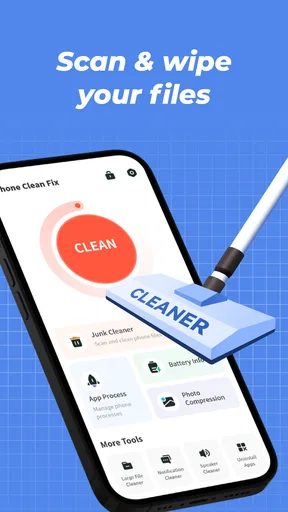
- Junk File Cleaner: This feature is like a digital vacuum cleaner, sucking away all the redundant files eating up your storage.
- Memory Boost: It frees up RAM by closing background apps you might not even know were running. It’s like giving your phone a well-deserved nap!
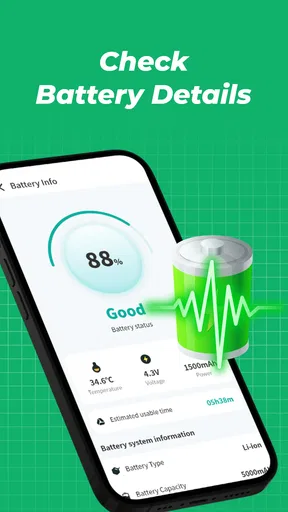
- Battery Saver: This helps you manage battery-draining apps, extending your phone’s juice just when you need it the most.
Using the App
Using Phone Clean Fix daily has been a game changer. The app’s smart notifications suggest when to run cleaning processes, so you can keep your phone in tip-top shape without even thinking about it. I found that my device ran noticeably smoother, especially when switching between apps or playing graphics-intensive games.
Additionally, there’s a handy feature that helps manage large files, which is a lifesaver if you’re anything like me and have a knack for hoarding videos and photos.
Final Thoughts
After a week with Phone Clean Fix, I’m pretty impressed. It’s not just about cleaning; it’s about smart management of your device’s resources. The sleek design and ease of use make it accessible for everyone, tech-savvy or not. If your phone's performance is dragging you down, this app might just be the breath of fresh air you need.
So, if you’re ready to give your phone a performance boost, you might want to grab Phone Clean Fix from your app store. It’s like giving your device a spa day, and who wouldn’t want that?
Pros
- User-friendly interface simplifies tasks.
- Efficiently cleans junk files quickly.
- Improves device performance noticeably.
- Customizable cleaning options available.
- Compatible with a wide range of devices.
Cons
- Limited features in free version.
- Pop-up ads can be intrusive.
- Occasional lag during deep scans.
- Requires frequent updates for new threats.
- Some features need premium subscription.
FAQs for Phone Clean Fix
What is Phone Clean Fix and how does it work?
Phone Clean Fix is an application designed to optimize and clean your smartphone. It works by scanning your device to identify unnecessary files, cache, and apps that may be slowing it down. The app provides options to remove these files and boost your phone’s performance, ensuring smoother operation.
Is Phone Clean Fix safe to use on my device?
Yes, Phone Clean Fix is safe to use. The app does not access personal data or sensitive information on your device. It focuses on cleaning redundant system files and cache. However, it's always a good practice to read user reviews and ensure you download the app from a reputable source like the Google Play Store or Apple App Store.
Can Phone Clean Fix improve my phone's battery life?
Phone Clean Fix can help improve your phone's battery life by identifying and closing apps running in the background that consume power. By optimizing your device’s performance and reducing background processes, the app can contribute to longer battery life, though results may vary based on individual usage patterns.
What features does Phone Clean Fix offer?
Phone Clean Fix offers several features including junk file cleaning, cache clearing, memory boosting, and app management. It provides detailed reports on what is being removed, allowing users to make informed decisions. Additional features might include CPU cooling and real-time monitoring of system performance, depending on the app version.
Are there any in-app purchases or ads in Phone Clean Fix?
Yes, Phone Clean Fix may include in-app purchases and advertisements. While the basic features are typically free, advanced functionalities or an ad-free experience may require a one-time purchase or subscription. It’s advisable to review the app’s pricing details and user feedback to understand the full scope of any costs involved.


